

Modern Cornell Notes Worksheet
Free Apple Template; instant download link via email.
- Fully editable
- Instant delivery
- Works on Mac, iPad, iPhone
Preview

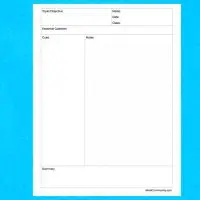
Modern variety of traditional Cornell notes template with course name and topic at the top. This 5-page template has dividing lines instead of fully contained boxes for cues, notes, and summary, in addition to a date and running page count along the bottom.
A five-page template for Cornell-style note taking. Notes text boxes are linked; Cue and Summary text boxes are independent. Control-click on date in footer to update. Additional pages can be added via Section>Cornell Page, but you'll need to reflow the text in the Notes text boxes appropriately.
How to use
- Download the file using the button above.
- Open it in Apple Numbers.
- Edit fonts, colors, and layout as needed.
- Print or export to PDF.
- Click to rate this package![Total: 4 Average: 4]
- Apple Pages Template, Notes Templates [Mac Pages / Numbers]
- Version
- File Size 0.00 KB
- Downloads 7030





 iWorkCommunity