
Cornell Note Taking Outline
Free Apple Template; instant download link via email.
- Fully editable
- Instant delivery
- Works on Mac, iPad, iPhone
Preview

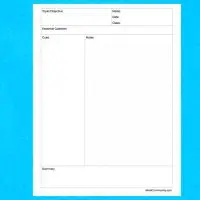
Cornell notetaking outline in portrait orientation. This single-page template has room for a title, main points along the left side, ample room for details, and an ending summary in the bottom right.
The same template, but you can now add a second page from the Insert > Pages menu. The new page is aptly called "Another page." You can also add it from the pages icon on the toolbar. Keep downloading!
How to use
- Download the file using the button above.
- Open it in Apple Numbers.
- Edit fonts, colors, and layout as needed.
- Print or export to PDF.
- Click to rate this package![Total: 19 Average: 3.5]
- Apple Pages Template, Notes Templates [Mac Pages / Numbers]
- Version
- File Size 0.00 KB
- Downloads 19488



 iWorkCommunity